What Is vLLM? A Plain-English Guide to the Open-Source Engine

Loading an open-weight model is enough to generate a response, but serving many users adds another problem: every request needs GPU memory while its answer is being generated. Requests arrive at different times, finish at different lengths, and compete for the same hardware.
vLLM is an open-source inference engine that manages this work. It schedules requests, allocates KV cache memory, and exposes models through an API. This guide explains how those pieces improve serving efficiency, how to run vLLM, and where cache reuse requires additional infrastructure.
What is vLLM?
vLLM is an open-source inference engine for large language models. It runs open-weight models on your GPUs, batches incoming requests, manages the memory each needs, and serves results via an HTTP API that speaks the OpenAI protocol.
The project started in the Sky Computing Lab at UC Berkeley and reports more than 2,000 contributors.
The configuration examples use v0.28.0. Check the releases page and pin the version you deploy.
Why vLLM exists: the memory problem it solves
An LLM request runs in two phases. Prefill reads the whole prompt and computes the key and value tensors for every token in it. Decode then generates one token at a time, and each new token needs the keys and values of everything before it. The engine stores that history rather than recomputing it. DistServe describes this retained attention state as the KV cache, stored in GPU memory for later decode steps.
That is the KV cache, and it is what fills your GPU. For an ordinary full-attention request that runs to completion, it grows token by token and stays live until the request finishes. Treat that as the default case, not a law. vLLM will preempt a request and recompute it later when cache space runs short, it honours a model's sliding window unless you disable it, and an offloading connector can move blocks off the device.
None of those exceptions change the arithmetic. Concurrency is mostly a question of how efficiently that cache is stored, and the two phases differ enough to read separately in prefill versus decode. vLLM's founding bet was that this is an allocation problem with a known solution from operating systems, worth borrowing at the memory-management layer rather than only inside the kernels.
How vLLM works
PagedAttention: treating the KV cache like virtual memory
PagedAttention is vLLM's technique for efficient management of attention key and value memory. Instead of one contiguous slab per request, sized for the longest output that request might produce, vLLM splits the cache into fixed-size blocks and hands them out as needed, the way an operating system hands out pages of virtual memory.
vLLM divides key and value data into fixed-size blocks, each holding a set number of tokens for one attention head.
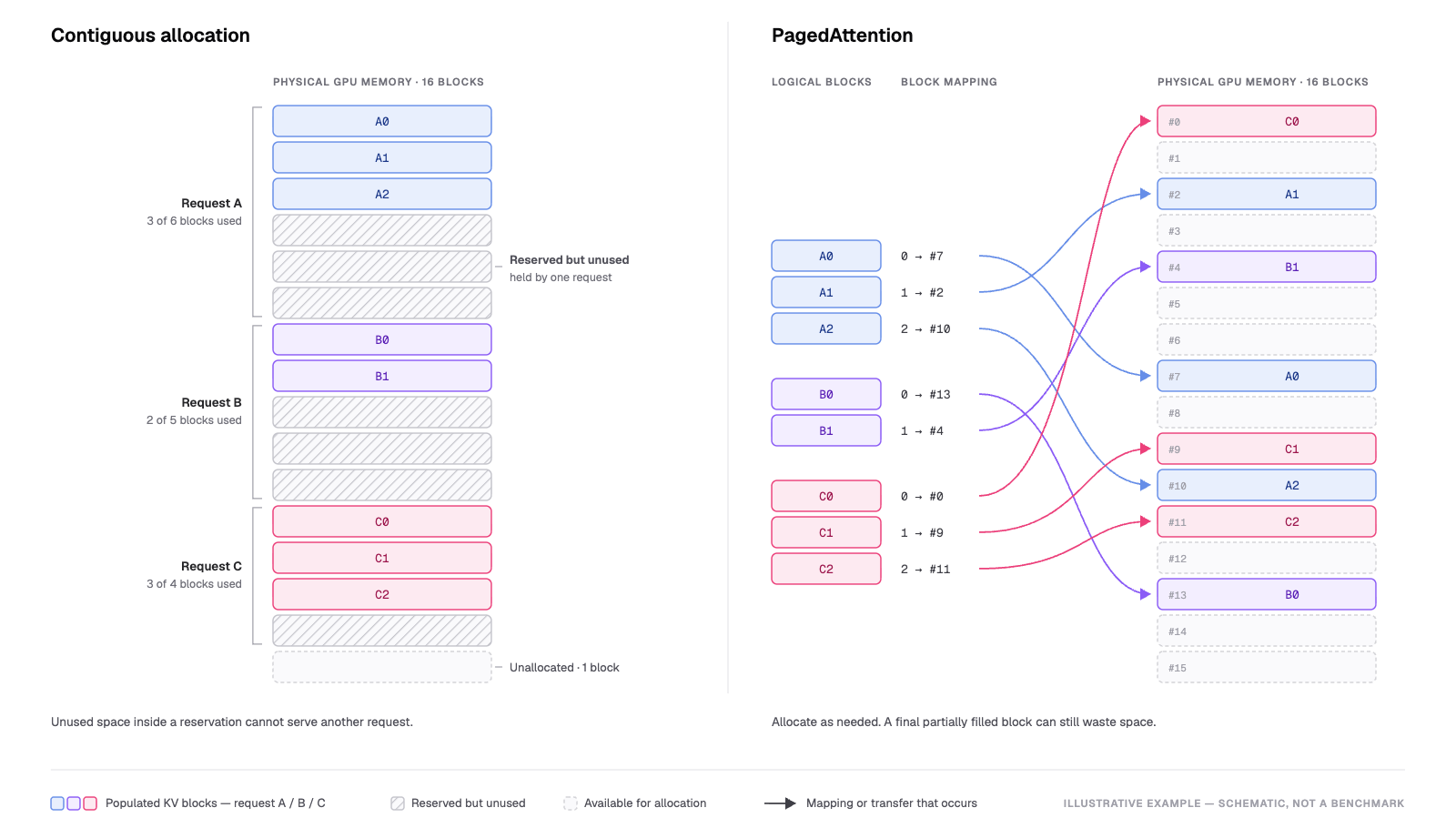
PagedAttention maps ordered logical KV blocks to physical blocks allocated as needed, reducing the need for large contiguous reservations.
Concept adapted from Kwon et al., SOSP 2023. Original illustration.
The paper by Kwon et al., SOSP 2023, describes the original PagedAttention design. Check your deployed version's documentation for implementation details.
Continuous batching: keeping the GPU busy
A fixed batch is only as fast as its slowest member. Continuous batching schedules at the granularity of a single decoding step, so a finished sequence leaves the batch and a queued one joins without the rest stalling. NVIDIA uses the terms in-flight batching, continuous batching and iteration-level batching for this same technique.
Chunked prefill breaks long prompts into smaller pieces and batches those pieces with decode requests, helping balance throughput and latency. vLLM V1 enables it by default when supported; check that it is active for your configuration.
Prefix caching: reusing work across requests
Prefix caching is where the KV cache stops being per-request scratch space and becomes reusable state. If two requests share an opening, a system prompt, a tool schema, a document, the blocks for that span go straight to the second request. Reusing an identical prefix avoids repeated prefill without changing model outputs.
There is a limit hiding in it. A cache hit "touches" the block, raising its reference count and pulling it out of the free queue. Those blocks still occupy capacity, and reclaiming it means an LRU eviction that destroys the entry. A hit saves you the prefill compute. It does not give you the memory back. That distinction is why KV cache is better understood as memory than as a performance trick.
Getting started with vLLM
Installing
vLLM is a Python library with pre-compiled C++ and CUDA binaries. The docs list the install as one line:
uv pip install vllm --torch-backend=auto
The documented requirements for NVIDIA GPUs are Linux, Python 3.10–3.13, and compute capability 7.5 or higher, covering cards such as T4, RTX20xx, A100, L4, H100, and B200. Those are engine requirements; individual models may need more memory or additional support. Windows is not supported natively.
Serving with the OpenAI-compatible API
One command puts a model behind an HTTP server:
vllm serve Qwen/Qwen2.5-1.5B-Instruct
That binds to http://localhost:8000, and --host and --port move it. The server implements the OpenAI API protocol, allowing applications to reuse existing clients. Point an OpenAI client at the local base URL, and it mostly works.
Compatibility still varies by endpoint. vLLM does not support suffix on /v1/completions and ignores user on /v1/chat/completions. Check these parameter differences before migrating an application.
A vLLM server currently hosts one model at a time. In the basic one-model-per-server deployment, three models mean three processes, three ports, and three sets of GPU memory. That is capacity planning, not a footnote. If you would rather not run it, serverless inference for open-weight models is the other path.
Offline batched inference
For a fixed set of prompts, offline inference avoids the need for a server. An eval run, a synthetic-data pass, a nightly job over a corpus: none of them need HTTP. The Quickstart documents the offline path as a first-class alternative. It is four statements.
from vllm import LLM, SamplingParams

prompts = [    "Hello, my name is",
             "The president of the United States is",
             "The capital of France is",
             "The future of AI is",]

sampling_params = SamplingParams(temperature=0.8, top_p=0.95)

llm = LLM(model="facebook/opt-125m")
outputs = llm.generate(prompts, sampling_params)
llm.generate queues the input prompts and returns a list of RequestOutput objects. It does not apply the model's chat template automatically, so apply the template yourself for instruct or chat models, or use llm.chat.
What you can run on vLLM: models and hardware
The catalog is wide, and the hardware story is broader than the CUDA reputation suggests. The project claims 200+ model architectures from HuggingFace, and the GPU installation docs carry separate tabs for NVIDIA CUDA, AMD ROCm, Intel XPU, and Apple Silicon. Blackwell parts need CUDA 12.8 or later.
vLLM recommends using one GPU when the model fits, tensor parallelism when it needs multiple GPUs within a node, and additional parallelism across nodes when necessary. Its documentation does not provide a universal VRAM-by-parameter-count table.
vLLM-Omni: the adjacent multimodal project people mistake for a feature
vLLM-Omni is a separate project in the vLLM organization rather than a mode enabled by pip install vllm. It extends serving to text, image, audio, video and action data, including diffusion transformers and multimodal outputs alongside autoregressive generation.
It reuses vLLM's KV cache management and provides an OpenAI-compatible server of its own. Evaluate it as its own project, not as a capability of the engine you already run.
Performance and the KV cache connection
Paging, continuous batching, and prefix caching are on by default. One lever is not. Disaggregated prefilling splits the two phases across instances so you can tune time-to-first-token and inter-token latency independently, and it is experimental. vLLM describes this as a latency-control feature, not a raw-throughput optimization.
The built-in prefix cache is limited to one replica's memory and can be evicted under LRU pressure. With several independent replicas behind a load balancer, a request can only reuse the local cache of the replica it reaches. Another replica may already hold the same context, but a local miss still requires prefill.
KV connectors can extend reuse beyond a single replica. vLLM supports an LMCache mode in which a standalone server holds KV state shared by one or more instances. Disaggregated prefilling remains experimental in vLLM and depends on third-party connectors for production deployments.
For workloads built on repetition- agent loops replaying tool definitions, RAG pipelines rereading documents, multi-turn sessions carrying the same history- that gap is not a rounding error. It is the hidden cost of serving open-weight models without context reuse.
Tensormesh Platform provides this cache management layer. It is not a serving engine and does not replace vLLM. It is a self-hosted caching layer that runs beneath the engine and owns the cache the engine would otherwise discard across a three-tier hierarchy: L0 in GPU HBM, L1 in host RAM, and L2 in filesystem-backed storage.
We were founded by the creators of LMCache, the open-source project Tensormesh is built on. Tensormesh Platform supports vLLM, and our compatibility matrix provides model and configuration details. For our separate Serverless Inference service, our pricing page lists no charge for cached tokens. For the self-managed route, see owning your context caching lifecycle end to end.
Conclusion
vLLM is one idea applied consistently: treat GPU memory as the scarce resource and manage it properly. PagedAttention makes the cache dense, continuous batching and chunked prefill keep the device fed, and prefix caching stops the engine recomputing work it already did.
The built-in cache is scoped to the engine process. vLLM manages the KV cache within one replica; everything beyond it is a connector you choose, wire up, and operate. If your traffic repeats itself, measure your prefix cache hit rate before buying another GPU. It helps estimate how much prefill work can be reused.
Contact our team to discuss KV cache reuse in your vLLM deployment.